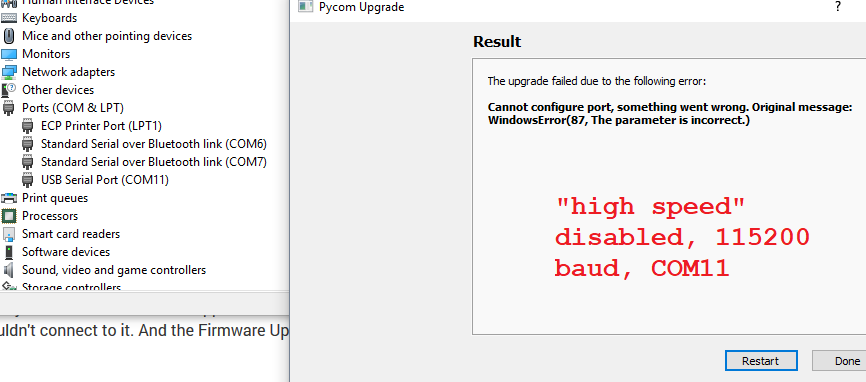
• dfu-util: Cannot claim interface 0

    Expansion Board expansion board firmware
    2
    0 Votes
    2 Posts
    954 Views
    J
    Solved. My mistake. I just connected to the expansion board, without the WiPy module on top of it. Then it had the error. With the WiPy module connected to the Expansion board, and following the instructions, the firmware update went fine.
  • UART: I cannot get any reading from GPS

    GPy gpy uart expansion board gps
    4
    0 Votes
    4 Posts
    730 Views
    A
    @robert-hh Hooray! I've got it! Signal wire was broken between pin and GPS. Thanks.
  • 0 Votes
    13 Posts
    2k Views
    danD
    @andrejpekarcik we are working on an updated version, I'll add it to my list and see what we can do. Thanks for the feedback!
  • 0 Votes
    45 Posts
    8k Views
    robert-hhR
    @szyba91 What do you mean with: does not work? The copying or the script? For copying Filezilla also support a upload option with the right cick on the file. SImple Double-Click also copies. Did you set the number of transfers to 1 in the settings? The ftp server in the xxPy devices is pretty limited. I had never problems using ftp for file transfer, but I'm using FireFTP, which is a Firefox plugin. That is convenient because I have firefox open anyhow almost all the time.
  • 0 Votes
    4 Posts
    1k Views
    S
    @archana-kadam Just add micropyGPS.py to your project folder and add import micropyGPS to main.py. If you have trouble uploading the file you should read the documentation.
  • Correct UART pins and problems

    LoPy lopy4 uart honeywell serial expansion board
    3
    0 Votes
    3 Posts
    1k Views
    robert-hhR
    @hopkapi If you connect G24 aka P3 -> 7 G11 aka P4 -> 6 GND -> 8 GND Vin -> 2 (5V) and run the LoPy from USB. then the electrical conditions shoul be OK, and the device shoudl be accessible via UART 1. SOmetimes the definition of Tx and Rx are reversed, so you may swap P3 and P4. That should not cause any harm to the devices. The UART setting according to the data sheet is baud rate: 9600, databits: 8, stopbits: 1, parity: no Some test code would be like: from machine import UART uart = UART(1, 9600) # init with given baudrate uart.init(9600, bits=8, parity=None, stop=1) # init with given parameters while True: data = uart.readall() if data is not None: print(data)
  • 0 Votes
    2 Posts
    467 Views
    robert-hhR
    @brady-aiello For the old expansion board you do not need the DFU drivers, as it uses an FTDI or similar USB/Serial bridge. it should work out-of-the-box. If you installed drivers according to the instructions you cited, remove them. See also the instructions here https://docs.pycom.io/chapter/gettingstarted/installation/firmwaretool.html#first in the expansion board 2 tab. Some people had trouble with Windows and the V2.x expansion board, and there is a lot of discussion around it in the board, which sometimes is more confusing than helpful. As result of that, the instructions in the manual were updated. b.t.w.: I prefer the V2 expansion board. Updating with the expansion board V3 or the pyxxxx board seems inconvenient, as it requires unplugging and replugging the board with a tight timing and reconfiguration of each OS.
  • 0 Votes
    3 Posts
    927 Views
    C
    @prawnhead thank you! That's exactly what I needed to know :)
  • 0 Votes
    4 Posts
    930 Views
    P
    @tealbrains & @Xykon : thanks all , that was that ! sudo dfu-util -D ./expansion3_0.0.9.dfu -R -v (I had added my user to dialout group already : not enought)
  • 0 Votes
    2 Posts
    550 Views
    robert-hhR
    @christian_kohler Did you set Filezilla to single link/passive mode? The number of simultaneous links have to be set in the server settings submenu->transfer settings for each connection. I'm using ftp all the time, and it is pretty reliable and fast. SInce I have Firfox open all the time anyhow, I prefer the FireFTP plugin.
  • 0 Votes
    2 Posts
    651 Views
    X
    @capnahab The Expansion Board 3.0 is already shipped with the latest firmware. The one posted on https://docs.pycom.io/chapter/pytrackpysense/installation/firmware.html is for reference only and identical to the one already flashed at the factory.
  • 0 Votes
    3 Posts
    2k Views
    P
    @xykon Thank you so much for the help; I believe you've rightly pointed out my error was assuming the board firmware was installed correctly and only the device firmware was the problem. Hopefully this can be useful to others: what I seem to have missed is the distinction between the Bootloader mode and the Application mode. Once I got my successful command line result from "dfu-util-static.exe", I didn't think the text from an immediately proceeding sentence beginning with "If, by mistake, the" would apply to me, so I likely skimmed over the crucial sentence: "If, by mistake, the libusbk driver was installed while the USB ID is the Application mode (0xF013 for Pytrack or 0xF012 for Pysense), then the Serial USB (CDC) driver has to be installed for application mode. This will allow Windows to allocate a COM port, which is required for REPL console." I recommend that the help page 4.2.1 (https://docs.pycom.io/chapter/pytrackpysense/installation/firmware.html) be rewritten to emphasize this point or at least put in a "Double-check Serial USB (CDC) driver is installed in Application mode" header right before the key sentence I missed. An additional element of confusion on that page is its direction regarding solely the "Pytrack/Pysense" boards, but it serves to document the steps for Expansion Board 3.0 firmware setup as well. Thanks again!
  • Relay and solenoid valve

    Discussion fipy transistor expansion board pinouts
    3
    2
    0 Votes
    3 Posts
    986 Views
    M
    @matthew said in Relay and solenoid valve: e if i can power the relay using the 5v o The "5V" label of the expansion board v. 3 is in reality the voltage input value. It can be around 5V when the board is connected with USB cable (if attached to a 5V source), but it is not when is power is sourced by the LiPo battery. On board there is a TPS2115A, that switches from one source to the other when, for example the battery is connected and we plug the USB cable. The Vin can be from 3.5 to 5.5 V. Solenoid valve control You can use many different options to control the solenoid valves as well as ways to power the solenoid valves and mechanical relay or equivalent driver. I personally prefer isolated solutions like optocouplers, solid state relays (photo MOSFET) (price went down in last years), ... An alternative can be, if You need to drive more than one, darlington transistor arrays like ULN2003, the low voltage ULN2003LV, or the newer equivalent TPL7407L. You can easily found mechanical relay boards with onboard optocoupler. You need to heck the datasheet to look for the mA at 3.3V that they sink.
  • 1 Votes
    7 Posts
    3k Views
    B
    @meven What you advised: "python -m pip install pycom" is working for me also, thank you However next, I got this error: "[pylint] E1101:Module 'pycom' has no 'heartbeat' member" but I could ignore it by: # pylint: disable=maybe-no-member pycom.heartbeat(False) pycom.rgbled(0xffff00)
  • 0 Votes
    2 Posts
    699 Views
    J
    Hi @asavvin Other than 3.3V and GND there aren't any fixed set of pins for that, it's whatever the code you use expects. For example in my case I used these RST = Pin('P19') DC = Pin('P20') BUSY = Pin('P18') CS = Pin('P4') CLK = Pin('P21') DIN = Pin('P22') But you'll need to use whatever your code is set to.
  • Cut out of the fipy

    Discussion fipy expansion board telnet error
    3
    0 Votes
    3 Posts
    728 Views
    M
    @livius Thank you i will try immediately
  • 0 Votes
    2 Posts
    812 Views
    robert-hhR
    @pierrot10 which model of the expansion board arte you using. Version 2 (one push button) or version 3 (two push buttons). Version 2 is more simple. If you cannot see the serial port, it is a problem of the physical connection (cable, jumpers on the board) or the OS X driver. Version 3 adds to the list of trouble sources the firmware in the PIC controller on the board. I assume that you also do not get a REPL prompt.
  • Power Consumption Issue

    GPy gpy power expansion board
    8
    0 Votes
    8 Posts
    2k Views
    T
    @SiMoS-IoT I improved the way the GPys were handling network failures and ended up implementing a function that manages delays between retries. So if the device can't connect it keeps waiting longer and longer to save power... Delays between attempts : {1,1,1,2,2,2,4,8,16,32} in minutes. You get the idea. Unfortunately I had to ditch all pycom boards for now and find an alternative solution. We faced major issues about 9 months ago, and did not get a prompt reply/support. See this thread: https://forum.pycom.io/topic/3390/potential-device-lockdown-network-providers/37 The Sequans modem is (STILL) not supported by Telstra : https://www.telstra.com.au/content/dam/tcom/business-enterprise/machine-to-machine/pdf/telstra-m2m-certified-devices-modules.pdf

  • Safe boot not working

    LoPy lopy safeboot expansion board
    4
    1 Votes
    4 Posts
    1k Views
    O
    @robert-hh This worked, thank you!